Posts mit dem Label code werden angezeigt. Alle Posts anzeigen

Montag, 18. Juli 2011

Wir programmieren Fußball Zitate

 So, hier mal ein paar Fußball Zitate in ihrer programmierten Version:

  1. round($ball);
  2. $game_length=90;
  3. while ($friends < 11) $friends++;
  4. eckig.put(rund);
  5. if(($city == MAILAND) || ($city == MADRID)) $country = ITALIEN;
  6. ich.setState(FINSHED);
  7. Strunz.getAllowed();
  8. player.setWeaknes(flashe.empty().getWeaknes());
  9. wordCount("Vielen Dank!"){ return 1; }
Was ist was?

Mittwoch, 27. Oktober 2010

Montag, 23. August 2010

Do not click this link!

[LINK]


Or do...

Hier das ganze als Script, damit ihr das euch schön als Shortcut einrichten könnt und damit JEDE Seite verbessert!
javascript:(function(d){d.body.appendChild(d.createElement('script')).src='http://bit.ly/c50Gpw'})(document)
Lang Lebe Lazer!

(via @janl -> JSConf)

Mittwoch, 27. Januar 2010

On my way to TweetMountain

I am using twitter now for quite a while. It has been a never ending source of inspiration and a great tool to implement and communicate some of my ideas. In the last few days I somehow realized that there are times in which the output of my twitter timeline just gets "somehow" overwhelming.

In the last view months I also started to dig a little into a programming language called processing (see processing.org). It is basically Java tweaked in a way that allows easy access to all graphic routines. Surfing thru the examples on OpenProcessing.org (a site built to share and exchange processing projects) I stumbled upon this cool sketch by antiplastik. I shows how simple physics and the use of OpenGL are in processing. This is a screen shot of the sketch in action:
Both inputs (the twitter overflow and the stacked boxes by antiplastik) fermented in my backbrain for a while till they came together in a small processing project I call TwitterMountain:
It uses little boxes that fall from the ceiling to create a pile of letters. The input is taken from my twitter timeline tweet by tweet, split into little boxes/letters and dropped onto the pile. Every now and the letters are lost and their boxes get deleted, but as twitter keeps on generating output the pile never vanishes.
My first implementation looked like this image above. The physics where there and I got the letters in the image. Twitter was connected and kept sending input.
Today I reworked it a little. First of all I added some limitations to box creation so the pile never fills my sketch completely. Secondly I created a nice sprite map that I can use as textures for the blocks. This way now the letters rotate correctly with their boxes.
So for now the TweetMountain is running and running, flooding my screen with an endless stream of tweets and letters.
There is some work left to do:
- clean code, write comments, use logging (gna gna gna... you know the routine)
- there seems to be a newer (and faster) version of jbox2d that I should check out (jbox2d is the library that does all the physics simulation in the background)
- build an Applet that can by used by everybody to watch his own twitter timeline

Maybe I even come up with some more ideas to put into the algorithm as well... I will keep you up to date with new versions.

Donnerstag, 19. März 2009

Windows XP: Environment Variables Bug

I just encountered a strange bug in the way that Windows XP handles environment variables.

Setting the variables in the GUI-Editor, it can be reproduced like this:

alpha = %busy1%\ddd
busy1 = %busy2%\test
busy2 = c:\
zulu = %busy1%\ddd

Save the settings, open the commandline and do some tests:
C:\>echo %alpha%
%busy1%\ddd

C:\>echo %busy2%
c:\

C:\>echo %busy1%
c:\\test

C:\>echo %zulu%
c:\\test\ddd
This means, that windows can resolve %busy2% in %busy1% but NOT %busy1% in %alpha%. Interestingly it CAN resolve %busy1% in %zulu%.

This only gives me one possible interpretation: Some recursion in the environment variables system of windows XP seems to use alphabetical sorting.

Any hints where this might derive from?

Donnerstag, 12. März 2009

QBert Assembler Code

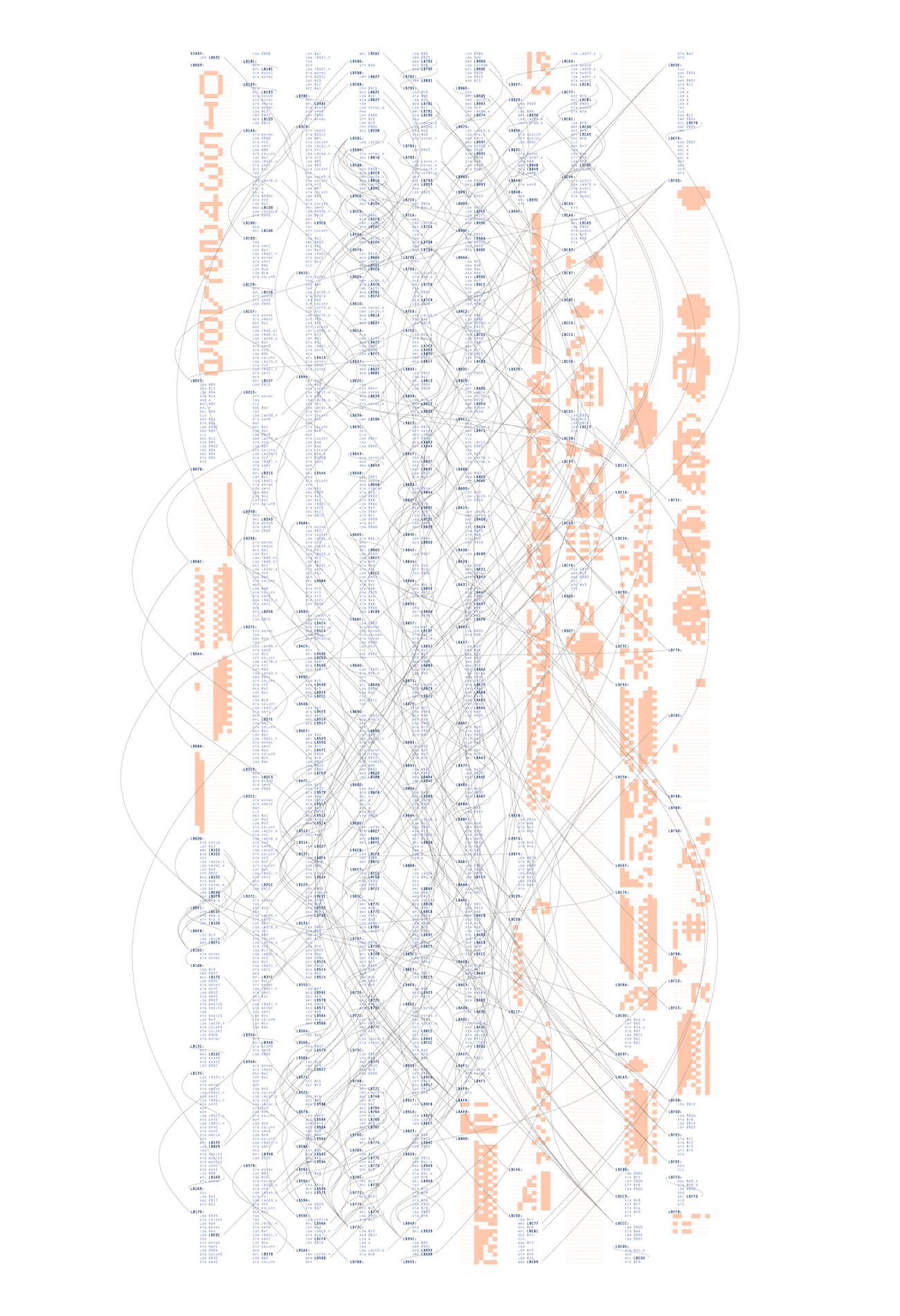
Wow, das sind mal schöne Bilder, die Ben Fry, da erzeugt. Und noch dazu welche, mit "solch historischen" Hintergrund. Er nimmt dazu den Assembler Code alter Computerspiele wie PacMan oder QBert und visualisiert diesen inklusive aller Sprungmarken und Datenelemente.

Dabei entstehen solche Bilder, wie der hier gezeigte Code von QBert:


Gefunden habe ich das ganze über diesen Post auf oreillyblog.de.

Die Originalseite von Ben Fry findet Ihr unter: http://benfry.com/distellamap/

MediaWiki #if syntax

Whenever I work on our wiki I have to look up the #if syntax (esp. for the more complex cases) and just do not find the right page on mediawiki.org. So I use this page as my personal cheat sheet.javascript:void(0)

#if:
{{#if: | true | false}} → false
{{#if: string | true | false}} → true
{{#if: {{{TEMPLATEVAR|}}} | true | false}} → true if the TEMPLATEVAR has any value


#ifeq:
{{#ifeq: string1 | string2 | value if true (string1 == string2) | value if false (string1 != string2) }}
{{#ifeq:{{{TEMPLATEVAR|}}} | yes | ja | nein }}


The right page for documentation can be found here: http://www.mediawiki.org/wiki/Help:Extension:ParserFunctions

Mittwoch, 21. Januar 2009

Mittwoch, 12. März 2008

Tagcloud auf blogger/blogspot

Seit einiger Zeit zeige ich ja im Sidebar des Blogs die Tagcloud an. Der Code dafür stammt von phydeaux3 und wurde hier auf seinem Blog veröffentlicht. Das ganze hat hier bei mir ohne Probleme funktioniert.
Allerdings wollte ich gezielt einige Tags nicht anzeigen, da sie deutlich zu oft vorkommen und nicht wirklich sinnvoll sind, sondern eher der Erzeugung von Kategorien hier im Blog dienen (z.B.: MyTunedCar oder auch Lieblings...). Dazu hab ich den original Code etwas abgeändert, damit man diese an zentraler Stelle ausblenden kann.

Anmerkung: Nicht erschrecken, im Javascript-Code werden Entitäten (wie bsp.: <, > und ") als Html-Entitäten dargestellt (also <, > und "e; im Beispiel). Das muss so sein, Blogspot/Blogger setzt das dann automatisch korrekt um.

Als erstes muss man natürlich das entsprechende Widget installieren. Wie das funktioniert steht hier bzw. direkt hier. Danach kann man dann den Code anpassen ,-)

Im Script oben in der head-Section muss eine neue, globale Variable deklariert werden, die alle Tags enthält, die nicht angezeigt werden sollen. Wir verwenden hier (für möglichst schnelle Zugriffszeiten) ein Assoziatives Array.

// ...
var lcShowCount = false;

// Add tags that should NOT be shown in the cloud (this part is NEW)
var excludedTags = new Array();
excludedTags[
"e;mytunedcar"e;] = true;
excludedTags["e;lieblings
"e;] = true;

Hiermit haben wir jetzt also gesagt, dass die Tags "mytunedcar" und "lieblings" nicht angezeigt werden sollen.
Jetzt müssen wir noch den Code-Teil ändern, der die Tags dann tatsächlich anzeigt. Der befindet sich weiter unten im Template. (Falls dort kein JS-Code angezeigt wird, oben das Kontrollkästchen "Vorlagen zum Erweitern von Widgets" aktivieren, dann sollte er angezeigt werden. Die Codestelle, die wir suchen sieht momentan in etwa so aus:

for(var t in ts){
if(ts[t] < cloudMin){
continue;
}
for (var i=0;3 > i;i++) {

Hier fügen wir jetzt folgende Zeile dazu"if(excludedTags[t] == true){ continue; }", so dass das ganze dann so aussieht

for(var t in ts){
if(ts[t] < cloudMin){
continue;
}
if(excludedTags[t] == true){ continue; }
for (var i=0;3 > i;i++) {

Damit wird nichts anderes erreicht, als dass wir den entsprechenden Tageintrag genau dann in der anzeigenden Schleife überspringen, wenn wir oben ihm gesagt haben, dass das tag nicht angezeigt werden soll.

Achtung: Dieser Code berücksichtigt Groß- und Kleinschreibung. Sollte ein Tag also doch angezeigt werden, obwohl ihr es vermeintlich ausgeschlossen habt, dann liegt das ziemlich sicher daran, dass ihr es oben in der head-Section falsch geschrieben habt.

Montag, 10. September 2007

Lightning Talk "Groovy on Grails"


Heute gab es am FZI einen "Lightning Talk" zum Thema "Groovy on Grails" von
Raphael Volz. Hier ein "Live-Mitschrieb" von der Session, also eher knapp gehalten und nur wirklich verständlich, wenn man die Folien dazu kennt (Folien gibt es hier)


Kurz und knapp

Grails: Framework für das schnelle Bauen von Webapplikationen
Groovy: Die Sprache, auf der Grails aufbaut

Insgesamt sind das also zwei Frameworks, die auf diversen Frameworks für Java aufbauen. Die Argumentation für so ein vorgehen ist, dass man so das "Prototyping" einfacher macht. Java ist nach dieser Argumentation zwar gut, aber oft zu kompliziert, um agile Webentwicklung zu betreiben und/oder einfache Prototypen zu entwickeln.


Einführung in Groovy
Baut auf Java auf.

  1. Feststellung: Der Syntax ist deutlich einfacher als bei Java.
  2. Feststellung: Variablen können Code enthalten, den ich abspeichern und wieder verwenden kann (sog. Closures). Das ist wohl vergleichbar mit den anonymen Lambda-Funktionen in Lisp. Leider hab ich nie Lisp programmiert ;-)
  3. Feststellung: Listen sind einfach zu coden! Dazu gibt es auch schöne Operatoren (abziehen von Elementen (=Entfernen) etc.). Maps sind wie Listen nur mit key:value Notation. Sortieren ist schon eingebaut und einfach zu bedienen)
  4. Feststellung: Überladen von Operatoren ist möglich.
  5. Feststellung: Es gibt sogenannte Builders, mit denen man verschiedene Sachen erzeugen kann. Insbesondere interessant, da es schon diverse fertige Builder gibt (XML, HTML, Swing-GUI, ...). Dazu gibt es dann auch Parser, die Groovy Objekte aus den entsprechenden Repräsentationen erzeugen.
Fazit zu Groovy: Schnell zu entwickeln. Kleiner/kurzer Code. Aber: schwerer zu debuggen und deutlich langsamer in der Ausführung als einfacher Java-Code.


Einführung in Grails
Grails ist ein MVC Web-Framework, das auf Spring, Hibernate, Groovy, Ant etc. aufbaut
Als Default-Web-Server wird Jetty verwendet.
"Programing by Convetion" oder auch "Convention over configuration"

So mach ich ein Programm damit:
%> grails create-app
Domänenobjekte beschreiben
%> grails generate-all
%> grails run-app

  1. Feststellungen: Objekten und ihren Attributen können Constraints zugewiesen werden. Insbesondere gibt es schon fertige Constraints für oft vorkommende Attribut-Typen (Email, ...)
  2. Feststellung: Suchen über freie Funktionsnamen (findByTitel("xy") ==> "WHERE title='xy', findByTitleLikeOrAuthor('xy','Fritz') ==> "WHERE title LIKE 'xy' OR author = 'Fritz'). Hier gibt es fixe Konventionen anhand derer dies Übersetzung gemacht wird.
  3. Feststellung: Prozesse, die mehrere Seiten verwenden müssen, können mit Hilfe eines Chain-Objektes direkt und einfach implementiert werden.
  4. Feststellung: Jobs (ähnlich wie Cron) sind machbar. Diese werden entsprechend im Hintergrund ausgeführt.
Fazit zu Grails: Mit dem Framework kann man wirklich schnell Web-Applikationen "prototypen". Muss aber noch einiges daran gemacht werden. Für einige private und kleinere Projekte werde ich es mir allerdings mal genauer anschauen.


Fragen am Ende der Session

  • Wie nachhaltig schätzt der Referent Grails/Groovy ein
    • Groovy wird wohl ziemlich sicher bleiben (insbesondere da es diverse Preise gewonnen hat) und da "man" sich als JSR-XXXX (als dynamische Scripting-Sprache für Java) Spezifikation beworben hat.
    • Bei Grails ist das noch nicht abzuschätzen. Momentan viel Buzz aber noch zu neu und zu unausgegoren.
  • Gibt es IDEs
    • Noch nicht so recht. Das Eclipse Plugin ist noch im SVN Status und der Referent hat noch keine Umgebung installiert bekommen.


Hinweise und Sachen, die mir nebenbei aufgefallen sind

  • Hier kann man Groovy runterladen: http://groovy.codehaus.org/
  • Hier kann man Grails runterladen: http://grails.codehaus.org/
  • Gargoylesoft Webclient als Zugriff auf's web (com.gargoylesoft.xxx). Das muss ich mir mal noch genauer ansehen.
  • Das in den Folien vorgestellt Grails Buch ist inzwischen veraltet und mancher Code daraus funktioniert nicht mehr
  • Im September kommt angeblich Grails 1.0